Denon DHT-T110 Under-TV Sound System
279,00 €
The Denon DHT-T110 is an under-TV sound system for TV programmes, films, games and music. Optical, coaxial and 3.5 mm inputs let you select a suitable wired connection for your television. Bluetooth A2DP enables wireless music playback from a compatible device. Dialog, Music and Movie modes help tailor playback to different content.
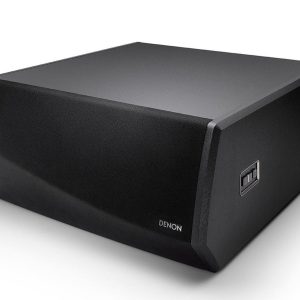
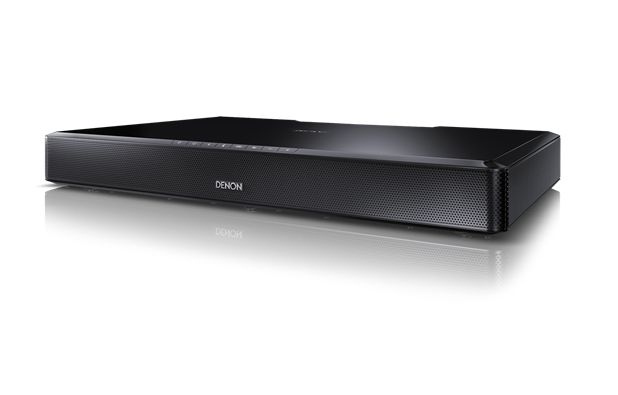
The Denon DHT-T110 sound system is a single-enclosure audio system designed to sit beneath a television. It is suitable for TV programmes, films, games and music. A television can be connected through the optical, coaxial or 3.5 mm input, while Bluetooth A2DP provides audio playback from a compatible wireless source.
This model is intended for listeners who want a separate television sound system without arranging several speakers around the room. Built-in Dolby Digital decoding, three listening modes and virtual surround sound allow playback to be adapted to different types of content.
Who is this system for?
The DHT-T110 is an under-TV sound system, also known as a TV speaker base. The television stands on top of the unit, so there is no need to find a separate position for a soundbar in front of the screen. This arrangement also helps keep the television screen unobstructed.
The system is housed in a single enclosure and works as a self-contained television audio solution. It is intended for buyers who do not want to run cables to rear speakers around the room. It is not a package comprising several separate speakers.
Placing it beneath a television
The television stand or feet must fit completely on the top surface of the system. They must not extend beyond its edges or allow the television to wobble. As the dimensions and permitted load are not stated here, these details must be checked and compared before placing a television on the unit.
Position the enclosure on a level, stable item of furniture. Leave sufficient room at the rear for the selected audio cable. The connections will be easier to reach if the cable is attached before the television is placed on top.
Connecting a television and other sources
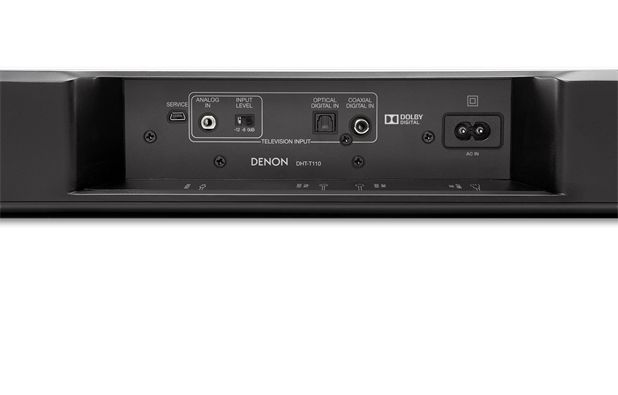
The optical digital input is intended for a television or another source equipped with a corresponding optical output. It carries audio through a single digital cable and is a practical first choice when this connection is available on the television.
The coaxial digital input provides another wired digital connection option. Choose it when the source has a coaxial audio output. Only one of the selected television audio connections needs to be used at a time.
The 3.5 mm analogue input is useful for an older television, portable player or another source with an analogue output. In this case, the audio signal is carried by an analogue cable.
The term single-cable setup refers to the audio signal connection between the television and the system. Select one output available on the television and connect it to the corresponding DHT-T110 input. The separate optical and coaxial connections do not need to be used together.
Wireless music playback
Bluetooth A2DP allows music to be streamed from a compatible phone, tablet or music player. The source device must support the A2DP profile. The wireless connection makes it possible to listen to music without disconnecting the television cable.
The aptX codec is supported. It is used only when the transmitting device also supports aptX. Otherwise, Bluetooth playback depends on the profiles and codecs available from the source device.
Listening modes and sound functions
You can select the Dialog, Music or Movie listening mode. Dialog mode is intended for speech-led material, Music mode for music and Movie mode for films. Choose the mode that best matches the source you are watching or listening to.
Virtual surround sound is produced from the system’s single enclosure. It does not require rear speakers to be positioned around the listening area. This function is useful for films and games when a separate multichannel system is not wanted.
Night mode is a separate option for evening listening. The Dynamic Bass function is intended to alter the presentation of low frequencies. Begin with the function switched off, and then compare the result from your usual listening position.
If the television outputs a Dolby Digital signal, the system can decode it. The audio output format is selected in the television’s settings. The name of the relevant menu varies according to the television model.
Technical specifications
| Model | Denon DHT-T110 |
|---|---|
| Type | Single-enclosure under-TV sound system |
| Intended use | Audio for TV programmes, films, games and music |
| Optical input | 1 digital optical audio input |
| Coaxial input | 1 digital coaxial audio input |
| Analogue input | 3.5 mm audio input |
| Wireless connection | Bluetooth with A2DP profile |
| Bluetooth codec | aptX |
| Audio decoding | Dolby Digital |
| Listening modes | Dialog, Music and Movie |
| Surround function | Virtual surround sound |
| Additional modes | Night mode and Dynamic Bass |
| Television connection | Single audio-signal cable setup |
FAQ
Is this a conventional soundbar placed in front of the television?
No. It is an under-TV sound system. The television stand or feet must fit safely on the system’s surface.
Which input is best for a television?
If the television has an optical output, begin with the optical connection. The coaxial connection is suitable for a source with a corresponding output. Use the 3.5 mm input for an analogue connection.
Can the system play music from a phone?
Yes, provided that the phone supports the Bluetooth A2DP profile. aptX is used only with a phone or other transmitter that supports this codec.
Are rear speakers required for films?
No. Virtual surround sound is created within the single enclosure. It does not replace a separate multichannel speaker system, but it does not require rear speakers.
How should I choose the right listening mode?
Choose Dialog for speech-led programmes, Music for music and Movie for films. Compare the available options from your normal listening position before making the final choice.
How can I check whether my television will stand safely on the system before buying?
Compare the dimensions of the television stand or feet with the dimensions of the system’s top surface, and check the permitted load. The stand or feet must fit completely on the surface, must not extend beyond the edges and must not cause the television to wobble. Because these DHT-T110 details are not provided in the supplied description, check them in the manufacturer’s documentation or with the retailer before purchasing.