Audio-Technica AT-LP120XUSB Silver Turntable
Original price was: 330,00 €.300,00 €Current price is: 300,00 €.
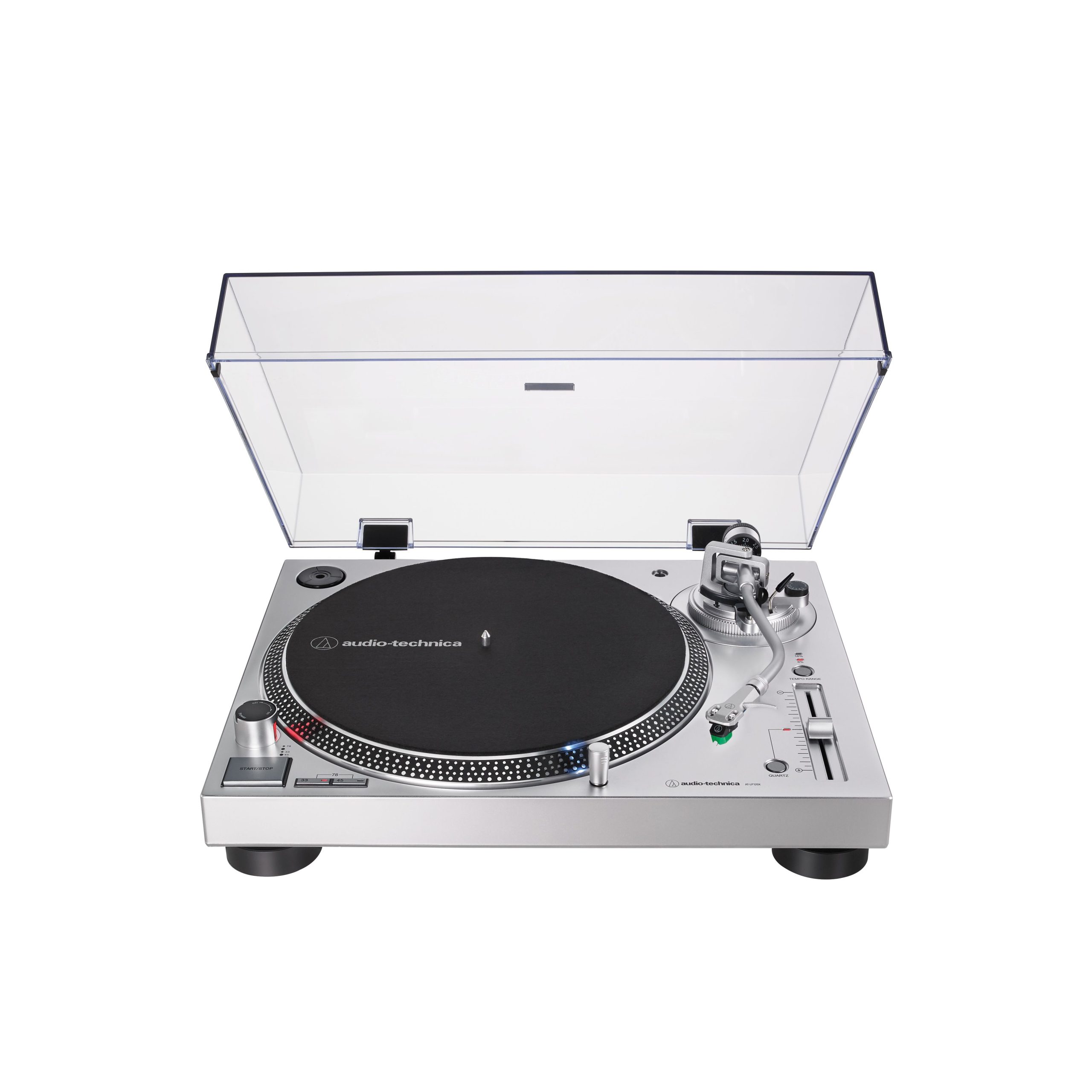
Audio-Technica AT-LP120XUSB Silver is a fully manual USB turntable for listening to vinyl records and transferring recordings to a computer. Direct drive provides direct control over rotation, while the 33⅓, 45 and 78 rpm settings accommodate different record formats. PHONO and LINE modes support systems with either a phono input or a standard analogue line-level input.
Audio-Technica AT-LP120XUSB Silver is a three-speed, fully manual USB turntable designed for listening to records and transferring recordings to a computer. Its direct-drive system and electronic brake provide direct control over platter rotation. The 33⅓, 45 and 78 rpm settings accommodate records in different formats.
Fully manual operation means that the listener lowers the tonearm onto the record and returns it after playback. This operating method is suitable for anyone who prefers hands-on control throughout the listening process.
Construction and drive system
A DC servo motor drives the cast aluminium platter directly. Starting torque of more than 1.0 kgf·cm helps the platter reach the selected speed, while the electronic brake is used to stop rotation.
The balanced S-shaped tonearm is fitted with a removable AT-HS6 headshell. This arrangement allows the headshell to be detached when installing or maintaining the cartridge. The tonearm is compatible with phono cartridges weighing 3.5-8.5 g.
The turntable weighs 8 kg without its dust cover. Its cabinet is 452 mm wide, so allow enough room for the unit and its cables before placing it inside a cabinet or on a shelf.
Analogue and USB connections
PHONO mode provides a nominal 4 mV signal. Select this mode when connecting the turntable to an amplifier’s PHONO input or to a separate phono preamplifier. With this connection path, the RCA cable’s grounding wire can be attached to the appropriate GND terminal.
LINE mode provides a nominal 240 mV signal through the built-in phono preamplifier. The preamplifier has a nominal gain of 36 dB with RIAA equalisation. Select this mode when connecting the turntable to an AUX, LINE or other analogue line-level input.
Do not connect the LINE signal to a PHONO input, as it would be amplified and equalised a second time. Likewise, do not connect the PHONO signal to an ordinary line-level input without a phono preamplifier, because the signal will be too weak.
The USB interface complies with the USB 1.1 standard and sends the turntable’s analogue signal to a computer. Analogue-to-digital conversion is performed at 16-bit resolution, with a choice of 44.1 or 48 kHz. Use your preferred audio-recording software to capture the signal on the computer.
The original system requirements specify Windows 7 or later and Mac OS X or later. Compatibility with current operating systems and recording applications must be checked separately.
Setup and operation
Before listening, install the headshell and balance the tonearm using the supplied counterweight. Then set the tracking force required by the installed cartridge. The anti-skating adjustment has a range of 0-4 g.
Select the correct rotational speed for the record. The supplied adapter is intended for 45 rpm records with a large centre hole. Although the turntable includes a 78 rpm setting, a stylus suitable for the groove of the particular 78 rpm record is required.
An AT-VM95E phono cartridge is installed as standard. Its corresponding replacement stylus is the AT-VMN95E. The removable headshell makes cartridge maintenance more convenient, but the tonearm must be readjusted after every cartridge or headshell change.
Placement and audio system
Place the turntable on a firm, level and horizontal surface, away from loudspeakers and equipment that produces strong vibration. Mechanical vibration can reach the stylus and be amplified along with the music signal. The supplied felt mat should be placed on the aluminium platter.
The LINE output allows the turntable to be connected to a stereo amplifier, an AV receiver with an analogue input or powered speakers. The PHONO signal path is intended for systems with a suitable phono input. The USB interface is used for recording to a computer; it does not power loudspeakers.
Technical specifications
| Type | Three-speed, fully manual USB turntable |
|---|---|
| Colour | Silver |
| Motor | DC servo motor |
| Drive system | Direct drive |
| Speeds | 33⅓, 45 and 78 rpm |
| Platter | Cast aluminium |
| Starting torque | More than 1.0 kgf·cm |
| Braking system | Electronic brake |
| Wow and flutter | Less than 0.2%, weighted measurement at 3 kHz according to the JIS method |
| Signal-to-noise ratio | More than 50 dB |
| PHONO output level | Nominally 4 mV at 1 kHz and 5 cm/s |
| LINE output level | Nominally 240 mV at 1 kHz and 5 cm/s |
| Phono preamplifier gain | Nominally 36 dB, RIAA equalisation |
| USB analogue-to-digital conversion | 16-bit, 44.1 or 48 kHz |
| Computer interface | USB interface compliant with the USB 1.1 standard; USB 1.1 or later port required |
| Original system requirements | Windows 7 or later; Mac OS X or later |
| Power consumption | 2.75 W |
| Tonearm | Balanced S-shaped tonearm with removable headshell |
| Effective tonearm length | 230.5 mm |
| Tonearm overhang | 16 mm |
| Tracking angle error | Less than 3 degrees |
| Compatible cartridge weight | 3.5-8.5 g |
| Anti-skating range | 0-4 g |
| Phono cartridge | AT-VM95E |
| Replacement stylus | AT-VMN95E |
| Dimensions | 452.0 × 352.0 × 141.6 mm, width × depth × height |
| Weight | 8 kg without dust cover |
Included accessories
- AT-VM95E phono cartridge
- AT-HS6 headshell
- 1.9 m USB cable
- Dual RCA cable with grounding wire
- Tonearm counterweight
- Felt mat
- Dust cover
- 45 rpm adapter
FAQ
Which output mode should I use with a stereo amplifier?
Select PHONO mode when connecting to the amplifier’s PHONO input. For an AUX, LINE or other line-level input, use LINE mode and the turntable’s built-in phono preamplifier.
Can the turntable be connected to an AV receiver or powered speakers?
Yes, provided that the equipment has an analogue line-level input. Use LINE mode for this type of connection. The USB interface is not intended for connecting or powering speakers.
Does the tonearm return automatically at the end of a record?
No. Operation is fully manual, so the listener must lower the tonearm and return it after playback.
What is required to record vinyl on a computer?
You need an available USB port, the supplied cable and audio-recording software. Recordings can be captured in 16-bit format at either 44.1 or 48 kHz.
Can I play 78 rpm records immediately?
The turntable provides the required speed, but the stylus must be suitable for the groove of the specific 78 rpm record. An unsuitable stylus may not track the groove properly.
When does the tonearm need to be readjusted?
Balance the tonearm and reset the tracking force and anti-skating adjustment every time you change the phono cartridge or headshell.
Where should I place the turntable?
Choose a firm, horizontal surface. Do not place the turntable next to loudspeakers or on furniture that readily transmits vibration.
What should I know about the power supply?
The supply voltage and mains frequency depend on the specific regional version of the turntable. Before connecting it, check the markings on the unit or its power-supply component.