Tellurium Q BU-DXLR Digital XLR Cable
274,00 €
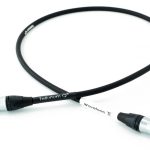
Tellurium Q BU-DXLR is an entry-level digital XLR cable for connecting compatible digital audio components. It is used between a digital XLR output and the corresponding input. The cable does not convert the signal format, so both connected devices must use a compatible digital connection.
Tellurium Q BU-DXLR is an entry-level digital XLR cable designed specifically for digital audio connections. It provides a dedicated signal path between compatible digital audio components and should be selected according to the connection type supported by both devices.
Purpose and product selection
This model is intended to carry a digital audio signal rather than an analogue audio signal. Although XLR-shaped connectors are found on equipment serving many different purposes, their similar appearance does not mean that every XLR connection performs the same function. It is therefore important to distinguish between digital and analogue connections before choosing or installing the cable.
Both connected devices must have the appropriate digital XLR sockets. The connector shape alone is not enough to establish compatibility: the output of the source and the input of the receiving component must also use a matching digital signal format. Check the labels on both devices and consult their documentation if the purpose of either socket is unclear.
The cable does not change the signal format and does not convert a digital signal into an analogue one, or an analogue signal into a digital one. Any required conversion must be performed by a suitable component designed for that task. The BU-DXLR simply forms the connection between compatible digital components.
Connection and installation
Connect the cable from the digital output of the source component to the corresponding digital input on the receiving component. Before making or changing the connection, turn down the system volume or switch off the equipment. This helps prevent unwanted sound while components are being connected or inputs are being changed.
Insert each connector straight into its socket. Do not twist the connector or force it into place. If the socket or connector has a locking mechanism, release it before removing the cable. When disconnecting, hold the connector body rather than pulling on the cable itself. This keeps the pulling force away from the cable and places it on the part intended to be handled.
Route the cable without sharp bends, crushing, or continuous tension. Leave enough space behind the equipment for the connector and for a gentle cable path. Avoid positioning the component so close to a wall or cabinet panel that the connected cable is forced into a tight bend. A little clearance also makes later system changes easier and reduces unnecessary strain on the equipment sockets.
Once the cable is installed, confirm that it is connected to the intended digital output and input before restoring the normal listening level. If the system does not produce sound, check the selected source output and receiving input first. A secure physical connection cannot compensate for an incorrectly selected input or an incompatible signal path.
Use in an audio system
In a stereo system, the cable can connect a digital source to a converter or an amplifier that has the appropriate digital input. It can also be used in a home cinema system to connect a digital source to a compatible amplifier. In every case, the function of the sockets on both components must match the cable’s digital purpose.
Separate signal paths require separate cables. The number of cables needed is determined by the number of digital outputs and inputs being connected, not by the number of loudspeakers in the system. This cable is not connected directly to passive loudspeakers. Passive speakers require the appropriate speaker-level connection from an amplifier, whereas the BU-DXLR is used between compatible digital audio components.
Technical specifications
| Manufacturer | Tellurium Q |
|---|---|
| Model | BU-DXLR |
| Product type | Digital XLR cable |
| Product class | Entry-level |
| Purpose | Digital audio signal transmission via an XLR connection |
FAQ
Can this cable be used with analogue XLR connections?
This model is intended for digital signal transmission. For an analogue connection, choose a cable designed for that purpose, even if the connector bodies appear identical. Matching the visible connector shape does not by itself confirm that the connection is suitable.
Is it suitable for a digital-to-analogue converter?
Yes, provided that the converter has a suitable digital XLR input. The source component must also have the corresponding digital output. The converter, rather than the cable, performs the conversion from a digital signal to an analogue signal.
Can the cable be connected to a microphone input?
A microphone input is generally intended for an analogue signal. This model is designed for a digital connection, so a microphone input does not match its intended use. The presence of an XLR-shaped socket should not be treated as confirmation of compatibility.
Does the cable convert a digital signal into an analogue signal?
No. Signal conversion is carried out by a device designed for that function, such as a converter. The cable only provides a connection between digital components whose outputs, inputs, and signal formats are compatible.
Can I use a simple adapter with a different type of socket?
A mechanical adapter alone may not be sufficient because the signal format must also match. An adapter can change how connectors physically fit without converting the signal they carry. Where the connected devices use different formats, an active converter may be required.
Is this cable connected directly to passive loudspeakers?
No. It is intended to connect compatible digital audio components, not passive loudspeakers. The quantity required is based on the digital connections between components rather than on the number of speakers in the system.
How should I test the connection when switching on the system for the first time?
Select the appropriate output on the source and the matching input on the receiving device. Begin at a low volume, then check that the signal is being transmitted consistently. If there is no sound, verify the selected input and output as well as the physical connection before increasing the volume.