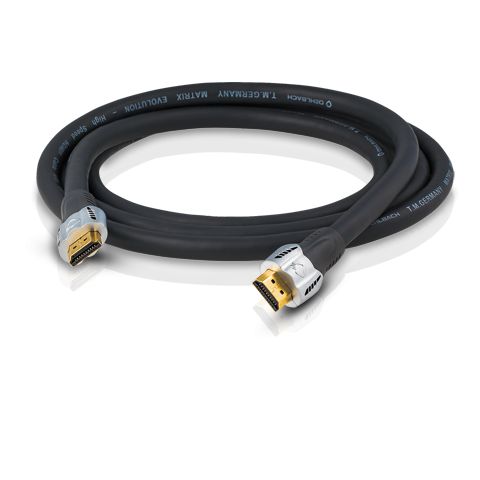
Oehlbach Matrix Evolution HDMI Cable
55,00 €
Oehlbach Matrix Evolution is a High-Speed HDMI cable for connecting a television, Blu-ray player, AV receiver or other HDMI device. It supports data rates of up to 18 Gbit/s and 4K video up to 2160p at 60 Hz. HDMI Ethernet Channel can replace a separate network cable between compatible AV devices. ARC returns audio through the same HDMI cable when both connected devices support the function.
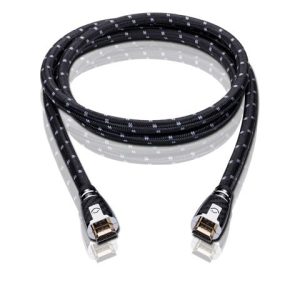
Oehlbach Matrix Evolution HDMI is a High-Speed HDMI cable for connecting AV equipment. It carries video, audio and control signals at data rates of up to 18 Gbit/s. It supports Ultra HD 4K and 2K resolutions up to 2160p at 60 Hz.
The cable is designed for televisions, Blu-ray players, AV receivers and other compatible HDMI devices. Lengths ranging from 0.75 to 20 metres are available. Every cable in the series is black.
Video transmission capabilities
The cable supports 4K Ultra HD video at either 50 or 60 Hz. It also supports Full HD, 3D video at 4K resolution and the 21:9 cinema aspect ratio. These capabilities are useful when connecting a television to an AV receiver, player or another video source.
Support for 30-bit, 36-bit and 48-bit colour depth allows the cable to carry the extended colour information supplied by a compatible source. The x.v.Color colour space is supported as well. The video mode actually available depends on both connected devices and their settings.
Audio, ARC and device control
Audio Return Channel allows sound from a television to be sent back to a compatible AV receiver through the same cable. An ARC connection therefore does not require a separate audio cable. This function must be enabled on the connected equipment.
The cable supports up to 32 digital audio channels, 5.1-channel sound, DTS-HD and Dolby TrueHD. The selected format must be supported by both the signal source and the device receiving the audio.
HDMI CEC carries control commands between compatible AV devices. CEC 2.0 support is specified for this cable. The connected equipment determines how CEC operates and which commands are available.
Ethernet channel
HDMI Ethernet Channel can transfer network data between HDMI devices that support this function. For example, it can connect a compatible Blu-ray player and AV receiver without an additional network cable.
HEC is not a replacement for a conventional network connection in every system. It works only when both devices in the HDMI connection support the function. Availability also depends on how the devices are configured.
Conductor and shielding
The internal conductor is made from silver-plated oxygen-free copper, identified as SPC/OFC. Triple shielding is used to limit the effects of external electromagnetic interference.
The connector contacts are plated with 24-carat gold. The straight connector housings are made from solid metal. A flexible fabric sheath helps when routing the cable behind equipment or furniture.
Choosing a length and installing the cable
Choose the shortest version that reaches both devices while leaving a little slack. A cable pulled too tightly can place strain on the HDMI sockets. The straight connectors also require sufficient clearance behind the equipment.
The longer versions are intended for connecting a projector, television or other AV equipment over a greater distance. High-Speed HDMI support is specified for every version in the series, including lengths up to 20 metres. Avoid bending the cable sharply immediately beside a connector.
The cable has no separate controls. ARC, CEC, HEC, 3D and extended-colour functions are selected through the settings of the television, receiver or source device.
Available length options
| Variant | Product number | Length |
|---|---|---|
| Matrix Evolution 75 | 42500 | 0.75 m |
| Matrix Evolution 120 | 42501 | 1.20 m |
| Matrix Evolution 170 | 42502 | 1.70 m |
| Matrix Evolution 220 | 42503 | 2.20 m |
| Matrix Evolution 320 | 42504 | 3.20 m |
| Matrix Evolution 510 | 42505 | 5.10 m |
| Matrix Evolution 750 | 42506 | 7.50 m |
| Matrix Evolution 1000 | 42507 | 10.00 m |
| Matrix Evolution 1200 | 42508 | 12.00 m |
| Matrix Evolution 1500 | 42509 | 15.00 m |
| Matrix Evolution 1800 | 42510 | 18.00 m |
| Matrix Evolution 2000 | 42511 | 20.00 m |
Technical specifications
| Product type | High-Speed HDMI cable with Ethernet Channel |
|---|---|
| Maximum data rate | 18 Gbit/s |
| Maximum video resolution | Ultra HD 4K and 2K, up to 2160p/60 Hz |
| 4K refresh rate | 50 or 60 Hz |
| Cinema aspect ratio | 21:9 |
| Full HD | Supported |
| 3D video | Supported at 4K resolution |
| Colour depth | 30, 36 and 48 bit |
| Additional colour space | x.v.Color |
| Audio Return Channel | ARC |
| Digital audio channels | Up to 32 channels |
| Multichannel audio | 5.1 channels |
| Audio formats | DTS-HD, Dolby TrueHD |
| Automatic AV control | HDMI CEC, specified CEC 2.0 support |
| Ethernet function | HEC |
| Internal conductor | Silver-plated oxygen-free copper, SPC/OFC |
| Shielding | Triple |
| Connector orientation | Straight |
| Connector material | Solid metal |
| Contact plating | 24-carat gold |
| Outer sheath | Flexible fabric sheath |
| Colour | Black |
| Available lengths | 0.75, 1.20, 1.70, 2.20, 3.20, 5.10, 7.50, 10.00, 12.00, 15.00, 18.00 and 20.00 m |
FAQ
How do I choose the correct cable length?
Measure the actual route between the HDMI sockets rather than the straight-line distance between the devices. Leave a small amount of extra cable so that the connectors can reach comfortably. Choose the specific variant by checking its length and product number in the table.
Does the Ethernet Channel replace a network cable?
Yes, but only between HDMI devices that support HEC. If either device does not support HEC, a conventional network connection will still be required.
How do I use the ARC function?
Connect the cable to the HDMI sockets marked ARC on the television and AV receiver. Then enable ARC and the required HDMI control options on both devices.
Is the cable suitable for 4K video at 60 Hz?
Yes. The specified support extends to 2160p resolution at 60 Hz. The source, display and their selected settings must all support this mode.
Does CEC 2.0 mean that the cable complies with HDMI 2.0?
No. CEC 2.0 refers to the control function and does not by itself confirm full HDMI 2.0 compliance.
Is the cable suitable for a stereo system?
It is suitable when the stereo amplifier or receiver has an HDMI connection. This cable is not intended for analogue RCA connections.
How can I use the cable in a home cinema system?
It can be used to connect a source, AV receiver and television within their HDMI signal chain. Each individual connection between two devices requires a separate cable.
Related products