Oehlbach 2.0 USB Plus USB-A / USB-B Cable
20,00 €
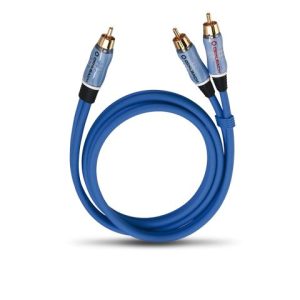
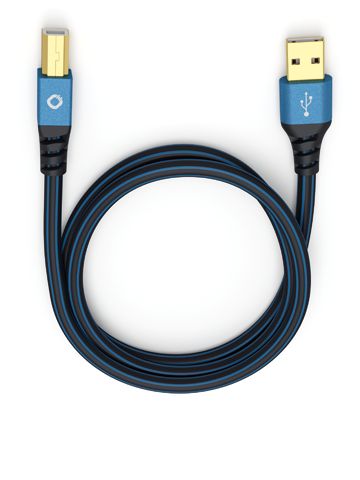
Oehlbach 2.0 USB Plus USB-A / USB-B is a USB 2.0 cable for connecting equipment with USB-A and USB-B ports. Its construction includes oxygen-free copper conductors, PVC shielding and metal connector housings. The highly flexible blue cable is easier to route behind equipment. Choose from seven lengths ranging from 0.50 to 10.00 metres.
Oehlbach 2.0 USB Plus USB-A / USB-B is a blue USB cable designed to connect a USB-A port to a USB-B port. The cable supports USB 2.0 and is available in seven lengths ranging from 0.50 to 10.00 metres. It provides a direct connection for one pair of devices when the ports on both devices match the cable connectors.
What this cable is designed for
One end of the cable has a USB-A connector, while the other has a USB-B connector. The USB-A end is normally connected to the source device, and the USB-B end to another device with the corresponding port. Because the connectors are different, this cable cannot replace a cable with two identical connectors.
This connector combination may be suitable for linking a computer to a digital audio device equipped with a USB-B input. It can also be used with other equipment that has a USB-B connection. The cable is intended for USB data connections. It does not replace an RCA, optical, coaxial or HDMI cable.
The purpose of a USB-B port depends on the connected device. In an audio system, this cable is suitable when the USB-B port accepts a signal from a USB-A source. Some components use this port for data or audio, while others provide it only for servicing. The presence of a USB connector alone does not reveal what the port is intended to do, and a service port is not an audio input. This cable is not suitable for the analogue inputs of an amplifier.
The cable does not have a USB-C, Micro-USB or Mini-USB connector, so it cannot be connected directly to any of those port types. It is also unsuitable for a pair of devices that only have two USB-A ports or two USB-B ports between them.
Connector and cable construction
The contacts are plated with 24-carat gold. This gold plating is applied to the contact surfaces rather than to the entire connector. Both connector housings are made entirely of metal. This is an important construction detail for buyers specifically looking for a cable without plastic connector housings.
The conductors are made from oxygen-free copper (OFC). The cable construction also includes PVC shielding.
The cable is described as highly flexible, making it easier to route behind audio-system components or around a computer. This flexibility is particularly useful when there is limited clearance between a port and the rear wall of a piece of furniture. Sharp bends should still be avoided when positioning the cable.
How to choose the right length
The available lengths are 0.50, 1.00, 1.50, 3.00, 5.00, 7.50 and 10.00 metres. Shorter cables are suitable for devices placed next to one another. Longer versions allow components located farther apart to be connected. Choose the length according to the cable’s actual route rather than the straight-line distance between the two ports.
After measuring the route, allow a small amount of extra length for bends and easy access to the connectors. The cable should not be stretched tightly between devices. Excessive spare length can also make tidy cable management more difficult. The best choice is the shortest version that reaches both ports without placing the cable or connectors under tension.
The 0.50 or 1.00 metre version is practical for components positioned close together. A length of 1.50 or 3.00 metres offers more freedom when arranging equipment on a rack or shelf. The 5.00 to 10.00 metre versions are intended for longer routes. Before selecting one of these lengths, remember to account for every furniture corner, change of direction and vertical section along the planned route.
Connection and placement
USB-A and USB-B connectors are not interchangeable. Insert each end only into the port designed for that connector type. When connecting or disconnecting the cable, hold the metal housing rather than pulling on the flexible cable itself. This prevents the connector from being pulled by the cable.
Leave enough room behind the device to prevent the cable from being bent sharply against its casing. Arrange any excess length in a loose loop. Do not trap the cable beneath the edge of furniture or coil it into a very tight radius. Careful placement helps maintain a neat route between the selected ports.
This cable connects one USB-A port to one USB-B port. It does not operate as a hub and cannot connect several devices simultaneously. If you need several separate connections, each pair of devices requires its own cable.
Technical specifications
| Product type | USB cable |
|---|---|
| Standard | USB 2.0 |
| First connector | USB-A |
| Second connector | USB-B |
| Contacts | Plated with 24-carat gold |
| Connector housings | Metal |
| Conductor material | Oxygen-free copper (OFC) |
| Shielding | PVC |
| Cable characteristic | Highly flexible |
| Colour | Blue |
| Available lengths | 0.50 m; 1.00 m; 1.50 m; 3.00 m; 5.00 m; 7.50 m; 10.00 m |
FAQ
Can I use this cable to connect a computer to an audio converter?
Yes, provided that the computer has a USB-A port and the converter has a USB-B input intended to receive the signal. Both devices must support the required USB connection.
Can it be connected directly to a USB-C port?
No. The cable has only USB-A and USB-B connectors. Neither end uses the USB-C format.
Which length should I choose for devices placed next to each other?
Begin by measuring the actual route between the ports. Choose the shortest length that provides a small amount of slack and does not place the connectors under tension.
Does this cable carry an analogue audio signal?
No. This is a USB 2.0 cable, not an analogue audio cable. An RCA or other analogue connection requires the corresponding type of cable.
How can I check whether a device’s USB-B port is intended for audio?
Check the label beside the port and consult the device’s operating instructions. The documentation must state that the USB-B port accepts audio or the required USB data signal and is not reserved solely for servicing.
Is this cable suitable for a home cinema receiver?
It is suitable only if the receiver has a USB-B connection intended for the required purpose. A service port cannot be used as an audio input.
What does 24-carat gold plating mean?
It means that the contact surfaces are plated with 24-carat gold. The complete connector is not made from gold; its outer housing is metal.