Tellurium Q SD-DXLR XLR Cable
1 395,00 €
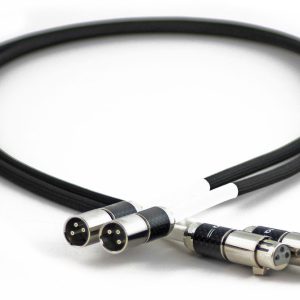
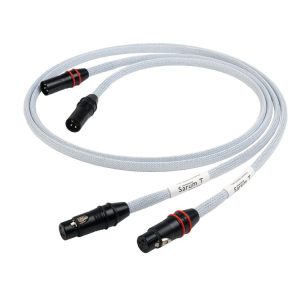
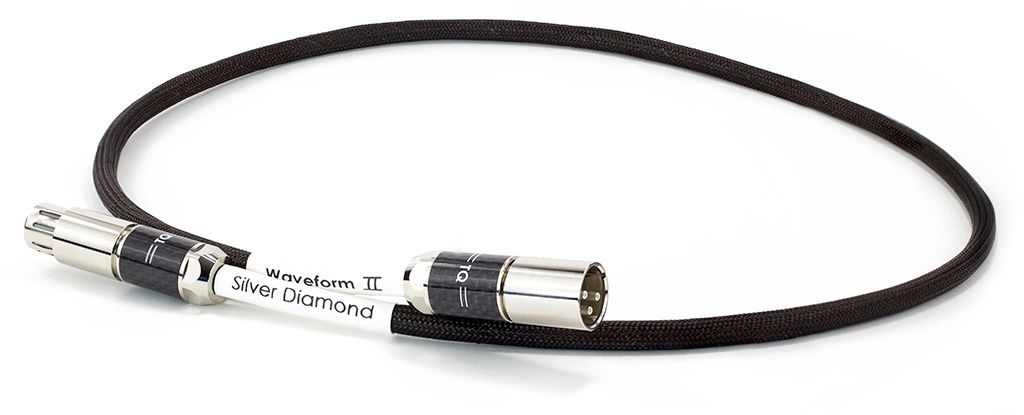
Tellurium Q SD-DXLR is a balanced analogue XLR interconnect cable for connecting compatible audio sources and amplifiers. The seller positions the Silver Diamond XLR as the top model across the manufacturer’s audio cable families and describes its sound as detailed, wide-ranging and natural. The cable carries an analogue line-level signal and is not intended for a digital AES/EBU connection.
Tellurium Q SD-DXLR is a balanced analogue XLR interconnect cable designed to carry line-level audio signals. It connects audio components equipped with balanced analogue XLR connections. This model is also known as the Silver Diamond XLR.
The seller positions the Silver Diamond XLR as the top model across Tellurium Q’s audio cable families. The seller describes its sound character as detailed, wide-ranging and natural.
What this cable is designed for
Typical applications include connecting separate components in a stereo system and carrying individual analogue audio channels in a home cinema system.
The cable can connect a source to an amplifier when the source has an analogue XLR output and the receiving component has an analogue XLR input. The source may be a network player, CD player or digital-to-analogue converter. The cable is also suitable for carrying a signal between a preamplifier and a power amplifier.
In a home cinema system, it can connect a processor’s balanced output to the input of a power amplifier. Each audio channel in this type of connection requires its own separate analogue signal path.
The purpose of a balanced connection
An XLR connection is used to carry a balanced signal. Its full benefit is available when both connected components support a balanced circuit. The presence of an XLR-shaped socket alone is not sufficient if that socket is intended for a different type of signal.
A balanced circuit is designed to provide better rejection of interference affecting both signal lines equally. This can be particularly useful between separate system components. The final result also depends on the design of the connected equipment.
This is not a digital AES/EBU cable. The connectors used for the two applications may look the same, but the purpose of the transmitted signal is different. Choose the SD-DXLR for an analogue audio connection, not for transmitting digital data.
How to assess compatibility with your system
If a component has only RCA connections, this cable cannot be connected to it directly. XLR and RCA are not simply differently shaped connectors. They may use different signal-transmission principles and different electrical circuits.
When a component offers both RCA and XLR connections, the most appropriate choice depends on its internal design. A balanced XLR path is most meaningful when the balanced connection is maintained from the source through to the receiving component.
Connection and system preparation
Switch off both system components before connecting the cable. First insert the connectors fully into their intended operating positions. Then check that the cable is not under tension and that the connectors are not being forced or bent sideways.
Route the signal cable so that it is not tightly trapped or compressed by furniture. Avoid sharp bends immediately next to the connectors. Careful installation reduces mechanical strain and makes it easier to rearrange the equipment later.
If signal and power cables need to cross, arrange them at as close to a right angle as practical. Long parallel runs are best avoided. This is a useful system-layout principle, particularly when many cables are gathered behind the equipment.
After making the connection, switch on the system with the volume set low. Check both channels and confirm that the sound is being transmitted consistently. Only then should you return the system to its usual volume setting.
Sound character and selection considerations
The descriptions of the cable’s sound express the direction presented by the seller. They should not be interpreted as frequency-response measurements or as other technical specifications.
These descriptions indicate the model’s position in the range and its intended sonic character. The cable should therefore be selected with regard to the overall level of the system, the connection types available and the kind of presentation you want.
Technical specifications
| Manufacturer | Tellurium Q |
|---|---|
| Model | SD-DXLR |
| Product name | Silver Diamond XLR |
| Product type | Balanced analogue XLR interconnect cable |
| Signal carried | Analogue line-level audio signal |
| Connector type | XLR |
| Position in the range stated by the seller | Top model across Tellurium Q’s audio cable families |
FAQ
Is this an analogue or digital XLR cable?
It is an analogue interconnect cable. It is intended to carry a line-level audio signal and should not be confused with a digital AES/EBU cable.
Which components can it connect?
It connects two audio components equipped with balanced analogue XLR connections. This may be a connection between a source and an amplifier or between a preamplifier and a power amplifier.
Is the cable suitable for a stereo amplifier?
Yes, provided that the amplifier has a balanced analogue XLR input. The audio source must also supply an analogue signal through a corresponding XLR output.
Can it be used in a home cinema system?
It can be used between a home cinema processor and a power amplifier. Both connections for the selected channel must be intended for balanced analogue signals.
Can the cable be connected directly to an RCA socket?
No. An XLR connector does not fit an RCA socket, and the electrical operation of the two connection types may differ. A direct connection requires the appropriate XLR connections on both components.
What should I check before connecting it?
Make sure that one socket is identified as an analogue XLR output and the other as an analogue XLR input. Do not confuse either of them with a digital AES/EBU connection.
How should the cable be arranged behind the equipment?
Leave sufficient space around the connectors and avoid sharp bends in the cable. Do not run a long section of it parallel to power cables.