Oehlbach BTR Evolution 5.1 Bluetooth Adapter
142,00 €
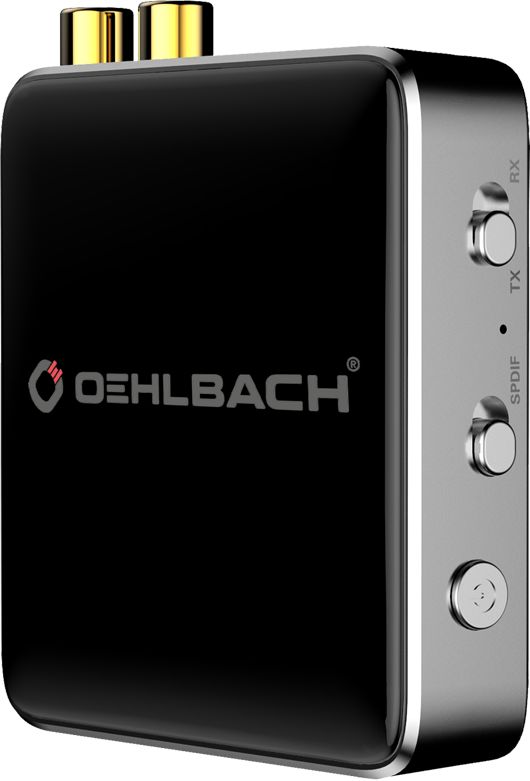
The Oehlbach BTR Evolution 5.1 is a Bluetooth audio transmitter and receiver for home audio equipment. It can send sound from a connected source to a wireless device or receive wireless audio for playback through an audio system. Choose the operating mode by identifying which device is the source and which one you will listen through.
The Oehlbach BTR Evolution 5.1 is a Bluetooth audio transmitter and receiver for home audio equipment. It can send sound from a connected source to a wireless audio device, or receive sound from a wireless device for playback through an audio system. Before connecting it, decide which way the sound needs to travel.
The product name specifies BTR Evolution 5.1, but the store’s description and package contents refer to BTR Evolution 5.0. Check the model marking on the specific unit before buying. The technical details below come from the store’s description; their applicability to the 5.1 model has not been confirmed.
Sending and receiving audio
Transmit mode sends audio from a source connected by cable to a Bluetooth audio device. Choose this direction when you want to hear a wired source through a wireless listening device. Receive mode works in the opposite direction: the adapter accepts wireless audio and passes it to connected audio equipment.
To choose the right mode, identify the source and the equipment that will play the sound. For example, if you want to play music from a phone through a stereo system, the phone is the source, so the adapter must receive its audio. Use the transmit/receive switch to select the mode. Before pairing, set the direction and check that your audio equipment is using the input or output to which the adapter is connected.
Connections and initial setup
The store’s description lists optical Toslink and analog stereo RCA connections. Choose a cable to match the connections on your equipment: use the optical cable where the audio path has a suitable Toslink connection, or RCA for analog stereo connections. The connector type alone does not establish the direction of the signal. Check that you are using an audio output on the source and an audio input on the equipment that will play the sound. If that equipment has several connections, select the one you used in its settings.
Start by tracing the audio path: which device sends the signal, and which one plays it? Set the adapter’s mode switch, connect the chosen cable and power supply, then follow the included instructions and your wireless device’s menu to pair them. The store lists pairing with two devices, but does not say whether both can be used at the same time. If you use the adapter to receive audio on one occasion and transmit it on another, check the switch position and selected audio connection each time.
Position in your audio system
Place the adapter near the equipment it connects to by cable, with enough room for the connectors and convenient access to the mode switch. The store specifies a 10 m wireless range without giving the measurement conditions. Consider the distance to the paired device and test the connection where you will actually listen. If the connection drops out in the room, try moving the adapter or the wireless device.
Stereo, home cinema and multiple components
In a stereo system, connect the adapter to a suitable audio connection on your amplifier or other equipment. When playing music from a phone, select the input used by the adapter on the stereo system. To send sound to a wireless listening device instead, first check that your audio source has a suitable output.
The same check matters in a home cinema system: inspect the inputs and outputs on the particular component you intend to use. The presence of an optical or RCA socket does not, by itself, tell you which way its signal travels. When watching video, check whether the sound and picture stay in sync in your system. No reliable latency measurement is provided for this model.
If your system has several audio components, decide in advance which one will connect to the adapter and which one will be used to select the audio source. This makes it easier to know where to change the input, volume or playback settings. Pairing with two devices does not, by itself, establish that their audio can be mixed or sent to two listening devices simultaneously.
Technical specifications
The store’s description specifies Bluetooth 5.0 with backward compatibility and aptX HD. Check the marking on the specific unit before attributing these details, or the figures below, to the BTR Evolution 5.1. The stated wireless range has no defined measurement conditions.
| Type | Bluetooth audio transmitter and receiver |
|---|---|
| Purpose | Sending or receiving an audio signal |
| Audio details listed by the store | 2.4 GHz frequency band; 48 kHz sampling rate; 24-bit depth |
| Power details listed by the store | 5 V voltage; 0.1 A current; 0.5 W power |
| Dimensions and weight listed by the store | 75 mm wide, 19 mm high, 75 mm deep; 347 g gross weight |
| Environmental conditions listed by the store | Temperature from -15 °C to +50 °C; humidity 5-90% |
| Finish listed by the store | Silver colour; 24-karat gold-plated contacts |
The package list names a BTR Evolution 5.0, a power supply, a 1 m USB charging cable, a 30 cm RCA-to-3.5 mm adapter, a 20 cm AUX cable, a 1 m optical cable and instructions. Because that list names the 5.0 model, check the contents of the 5.1 variant before ordering.
FAQ
What should I check if there is no sound after connecting the adapter?
First identify the audio source and the device you want to listen through. If the source is connected by cable, select transmit mode; if the source is a wireless device, select receive mode. Then check that your equipment is using the connected audio input or output and that the wireless devices are paired.
How do I choose between Toslink and RCA?
Check the sockets on both devices and the direction of the audio signal. Toslink is for the corresponding optical connection; RCA is for the corresponding analog stereo connection. Connect an output on the audio source to an input on the receiving side.
Can I use two paired devices at the same time?
The store says the adapter can pair with two devices, but simultaneous use has not been confirmed. If you need that function, check the instructions for the specific model.
How do I use the adapter with a stereo system?
To play audio from a wireless device through the stereo system, connect the adapter to a suitable audio input and select that input on the system. To send audio from a stereo source wirelessly, check that the source has a suitable audio output.
Can it be useful in a home cinema system?
Yes, if you want to add Bluetooth audio transmission or reception. The connection method depends on the inputs and outputs of your particular home cinema equipment. With video content, check audio and picture synchronisation yourself, as no reliable latency measurement is provided.