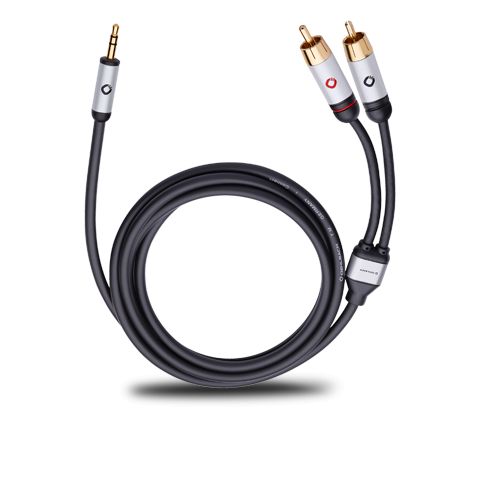
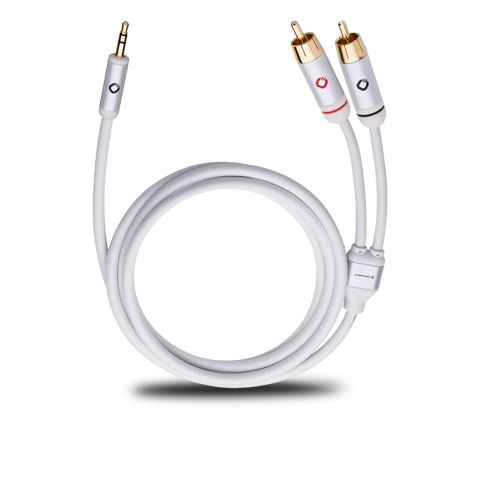
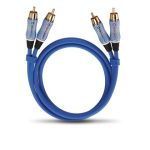
Oehlbach I-Connect J-35/R Analog Stereo Cable
32,00 €
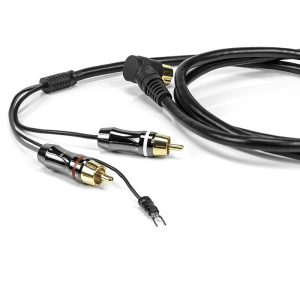
Oehlbach I-Connect J-35/R is an analog stereo cable for connecting a portable player to a Hi-Fi system. Its 3.5 mm plug connects to an analog audio output, while two RCA plugs connect to the left and right channel inputs. The all-metal plugs have 24-carat gold-plated contacts. Choose a black or white version in 1.50 m, 3.00 m or 5.00 m to suit the distance between your devices.
Oehlbach I-Connect J-35/R is an analog stereo cable for connecting a portable player to a Hi-Fi system. It has a 3.5 mm stereo plug at one end and two RCA plugs at the other. It is suitable when your audio source has a 3.5 mm analog output and your system has a pair of analog RCA inputs.
How to connect it
Insert the 3.5 mm plug into the player’s analog audio output. Connect the RCA plugs to the left and right channel inputs on an amplifier or another audio device. Each stereo channel then has its own connection. The cable carries an analog signal, so both ends must be connected to suitable analog audio sockets.
If you use the player’s headphone output, lower its volume before starting playback, then raise it gradually. Connect the RCA plugs to audio inputs, never to speaker terminals.
Select the system input connected to the RCA plugs and lower the amplifier’s volume before playing music. Once playback starts, check that you can hear both channels. If one is missing, make sure both RCA plugs are fully inserted into sockets belonging to the same input pair. The cable has no controls; use the settings on the source and the connected system to operate them.
Which system input should you use?
On a stereo system, look for an available pair of left and right analog RCA audio inputs. Active speakers or a home cinema receiver may also have such a pair, but check the sockets on your particular device before buying. The shape of an RCA socket alone does not establish that it is suitable: the chosen sockets must be analog audio inputs. Do not connect this cable to RCA outputs, a digital coaxial input, or a turntable input if your system has one.
Construction and everyday use
The all-metal plug bodies have 24-carat gold-plated contacts. When disconnecting the cable, grip the plug body instead of pulling on the cable. This also makes it easier to handle a connection behind other equipment.
The cable uses oxygen-free copper (OFC), with HPOCC® specified as the inner conductor material. Its multi-layer shielding is relevant when routing an analog audio cable near other leads in a system. As you plan the route, allow enough room for the plugs behind the equipment.
A durable plastic jacket covers the round, flexible cable. That flexibility is useful when running it behind a cabinet or between components on shelves. Leave some free cable near each connection so that it does not need to bend sharply at the plug. The connector details have a pearlescent finish.
Planning the cable route
Place the player where you can comfortably reach its controls and 3.5 mm socket. If you move it often, leave enough loose cable at that end; the connection should not support the player’s weight. Behind a cabinet, route the cable where furniture edges or doors will not pinch it. Where possible, keep it apart from power leads and check that the route does not pull on either end. Before arranging the equipment in its final position, make sure you will still be able to reach the plugs when needed.
Choosing a length and colour
The cable is available in 1.50 m, 3.00 m and 5.00 m lengths. Each length comes in black or white. Measure the route between the sockets before choosing, including any distance the cable must travel behind furniture. Allow enough slack for the plugs to reach their sockets without tension.
A shorter version suits a player placed next to the system. A longer one may be more practical when the devices are farther apart or the cable has to pass around furniture. Choose the colour to suit the visible part of your setup; both colours have the same plug arrangement.
In stereo and home cinema systems
Connected to a stereo amplifier, one cable carries the left and right channels from one source. With a home cinema receiver, use an analog stereo RCA input pair and select the corresponding input in the receiver’s controls. This cable does not carry separate multichannel audio channels.
If you want to connect several players, each needs its own suitable connection and an available input. The two RCA plugs on this cable carry the two channels of one player; they are not connections for two separate sources. Count the free input pairs on your system before planning several connections.
Technical specifications
| Feature | Details |
|---|---|
| Type | Analog stereo line cable |
| Connector at one end | One 3.5 mm stereo plug |
| Connectors at the other end | Two RCA plugs |
| Length options | 1.50 m; 3.00 m; 5.00 m |
| Colour options | Black or white; both colours are available in all three lengths |
| Plug bodies | All-metal |
| Contacts | 24-carat gold-plated |
| Conductor material | Oxygen-free copper (OFC); HPOCC® inner conductor |
| Shielding | Multi-layer |
| Jacket | Durable plastic |
| Cable shape | Round and flexible |
| Connector details | Pearlescent |
FAQ
Can I use this cable to connect a phone or tablet?
Yes, if the device has a suitable 3.5 mm analog audio output. A USB port or another digital connection alone is not enough for this cable.
Which amplifier sockets should I use?
Choose a pair of left and right analog RCA audio inputs. The RCA plugs are not intended for speaker terminals or a single digital coaxial socket.
Is it suitable for a home cinema receiver?
Yes, if the receiver has an available pair of analog stereo RCA inputs. This connection carries two audio channels, not a multichannel home cinema signal.
Can I connect two players with one cable?
No. The single 3.5 mm plug connects to one audio source. The two RCA plugs carry that source’s left and right channels.
How can I check which version I am choosing?
Compare the length, colour and product code: 1.50 m black – 60002, white – 60001; 3.00 m black – 60004, white – 60003; 5.00 m black – 60006, white – 60005. These identify all six versions listed by the store.
Which output should I use if my player has both headphone and line outputs?
If both are suitable 3.5 mm analog outputs, choose the line output for a connection to the system’s analog input. If you use the headphone output, start with the player’s volume low and raise it gradually.
Related products and categories
Related products