Oehlbach Easy Connect Opto Optical Digital Cable
15,00 €
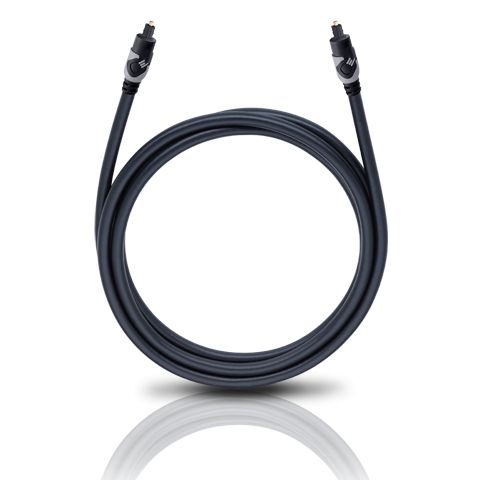
Oehlbach Easy Connect Opto is an optical digital cable for connecting compatible home audio devices. This highly flexible fibre-optic cable features double shielding, a durable plastic sheath and straight plastic-covered plugs. It is available in black in a choice of 1.00 m or 1.50 m lengths. Choosing the appropriate length allows the cable to reach both optical connections without being stretched or bent sharply.
Oehlbach Easy Connect Opto is a flexible optical digital cable designed to carry digital audio signals between compatible devices. It is available in 1.00 m and 1.50 m versions. Both variants are black, have a round cable profile and are fitted with straight plugs.
The cable connects the optical digital output of one device to the corresponding input of another. It can therefore link an audio source to an amplifier, receiver or converter. Both connected devices must have suitable optical connections.
Purpose and connection selection
An optical connection transmits a digital audio signal using light. It is suitable when the source device has an optical output and the audio device has an optical input. This cable is not a substitute for an analogue RCA, coaxial digital or HDMI connection.
Before choosing the cable, check the names and shapes of the connections on both devices. This helps prevent a situation in which one device only provides a different type of digital connection. The required connection type must match at both ends of the signal path.
The cable carries audio data, but it does not determine which audio formats are supported. Available formats, the number of channels and the output mode depend on the connected equipment. You may also need to select the optical digital output in the audio source’s settings menu.
Fibre-optic conductor
The cable uses a fibre-optic conductor internally. It is characterised by high light output and a low refractive index. These properties are intended to support the transmission of the optical signal through the cable.
Double shielding complements the internal construction. On the outside, a durable plastic sheath covers the optical fibre and is suitable for normal cable routing around home audio equipment.
Although the cable is highly flexible, the optical fibre should not be sharply bent or trapped under furniture. A gentle curve helps the cable retain its natural shape. Its round geometry also makes it convenient to route behind an equipment shelf.
Plug construction and space behind the device
The straight plugs are covered in plastic. Because the cable extends directly out from each connection, sufficient clearance must be left behind the device. This is particularly important when equipment is positioned close to a wall or near the back of a shelf.
When making a connection, hold the plug by its plastic body. Do not force it into place or pull it out by holding the cable. If the plug does not fit easily, check its orientation and the connection type again before proceeding.
How to choose the length
Easy Connect Opto 100 is 1.00 m long. It is intended for devices positioned close to one another. The shorter cable reduces unnecessary excess behind the equipment, but it must not be stretched or placed under tension.
Easy Connect Opto 150 is 1.50 m long. The additional 50 cm provides more freedom when routing the cable around a shelf or between different shelf levels. The longer version is also worth choosing when the straight plugs require enough room to form a gentle bend in the cable.
Before purchasing, measure the actual route between the connections rather than only the straight-line distance between the devices. Allow for shelf edges, other cables and the necessary slack. The selected length should reach both connections without placing the cable under tension.
Use in an audio system
In a stereo system, the cable can be used between a compatible digital source and an amplifier or converter equipped with an optical input. The same requirement applies in a home cinema system: the signal must travel from an optical output to an optical input.
One cable creates one direct connection between two devices. Connecting several sources requires separate optical inputs or an additional switching solution. The cable itself does not switch between sources and has no controls.
Technical specifications
| Product type | Optical digital audio cable |
|---|---|
| Conductor material | Optical fibre |
| Optical-fibre properties | High light output, low refractive index |
| Flexibility | Highly flexible cable |
| Shielding | Double |
| Sheath | Durable plastic |
| Cable geometry | Round |
| Plug type | Straight |
| Plug material and construction | Plastic-covered |
| Easy Connect Opto 100 length | 1.00 m (product number 132) |
| Easy Connect Opto 150 length | 1.50 m (product number 133) |
| Colour | Black |
FAQ
Which connections are required for this cable?
One device must have a compatible optical digital output, while the other must have the corresponding optical input. Analogue RCA, coaxial digital and HDMI connections are not suitable.
Which length should I choose for devices placed close together?
The 1.00 m version is suitable for a short, direct connection. Choose it only if the cable can reach both connections without being stretched or placed under tension.
When is the 1.50 m version useful?
It provides more freedom when routing the cable behind a shelf or between different shelf levels. The extra length also makes it easier to form a gentle curve rather than bending the cable sharply.
How can I check connection compatibility before buying?
Confirm that the signal source has an optical digital output and that the receiving device has an optical input. The connection names and shapes must match the cable’s plugs.
Do I need to adjust anything on the cable after connecting it?
No. The cable has no controls. You may need to select the optical output and the appropriate audio mode in the settings menu of the audio source or receiver.
Can the cable be bent sharply behind the device?
Sharp bends and compression should be avoided. Leave enough space around the straight plugs so that the cable can exit each connection in a gentle curve.
Can one cable connect several sources?
No. One cable directly connects two devices. Multiple sources require several optical inputs or a separate switching solution.